.heic · .heif for Windows 10 and 11
iPhone photos, visible in Windows Explorer.
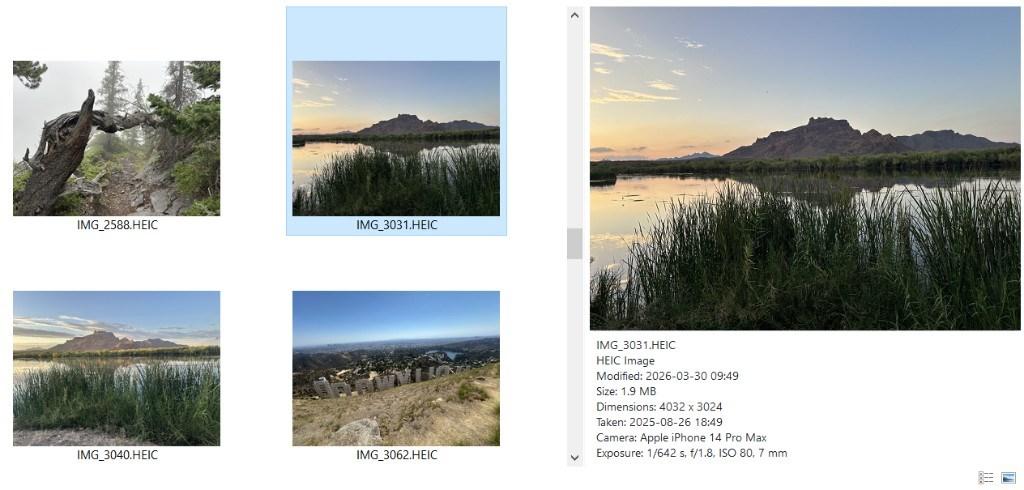
Thumbnails and a Preview pane for HEIC and HEIF photos, with no codec to buy from the Microsoft Store. Taken date, camera and exposure at a glance.
Windows 64-bit · 1-day trial, all features
No extra codec
Decoding is built in, so you do not need the paid HEVC Video Extensions from the Microsoft Store.
Turned the right way
Photos appear the way the camera recorded them, with the date taken, camera model and exposure in the preview pane.
Upgrades HEIC Explorer Preview
Already own HEIC Explorer Preview? Install this version over it. Your license key keeps working.
How it works
Three things Windows should have done on its own. Everything runs locally, inside Explorer.
Install
Run the installer. It adds a thumbnail provider and a preview handler for .heic, .heif to Windows Explorer. The app that opens those files stays exactly as it is.
Open a folder
Explorer draws real thumbnails right away. Switch to Large or Extra large icons to see them best.
Preview and inspect
Turn on the Preview pane (View › Preview pane, or Alt+P) to see a file without opening it, with its details underneath. Or right-click and choose Preview for a larger window.
Simple pricing
One-time purchase. No subscription, no account.
HEIC - Explorer Thumbnails and Preview
Thumbnails, preview pane and right-click Preview for .heic, .heif files.
- ✓ 1-day free trial, every feature unlocked
- ✓ Works offline. Files never leave your PC
- ✓ Windows 10 and 11 (64-bit)
- ✓ Does not change which app opens your files
- ✓ License key by email right after purchase
After the trial, thumbnails and the preview pane pause until a license key is entered. Nothing is uninstalled.
Every format
Explorer Thumbnails and Preview
PSD, SVG, HEIC, WPD in one app, with new formats as they ship. Turn each file type on or off in Settings.
$9.95
Questions
Do I need the HEVC Video Extensions from the Microsoft Store?+
No. Decoding is built in.
I bought HEIC Explorer Preview. Do I need to buy again?+
No. Install this version over HEIC Explorer Preview; it is the same product, renamed, and your EXPR license key keeps working.
Does it edit or convert my files?+
No. It only reads them to draw a thumbnail or preview. Files are never modified, and nothing is uploaded anywhere.
Which versions of Windows are supported?+
Windows 10 (1809 or later) and Windows 11, 64-bit. The installer is a standard MSI; Microsoft Store editions are on the way.
What happens after the 1-day trial?+
Thumbnails and the preview pane pause and the preview pane shows a purchase link. Enter a license key and everything resumes, with no reinstall.
Can I use one license on more than one PC?+
A license covers one Windows PC. Buy one license per machine; reinstalling on the same machine is fine.
Why do some thumbnails not appear right away?+
Windows caches thumbnails and fills large folders in the background. Refreshing (F5) speeds it up, and Settings › Maintenance can clear the cache.